

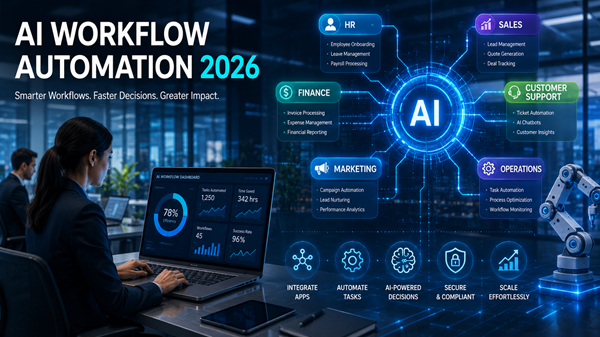
Imagine starting your workday without sorting through hundreds of emails, manually updating spreadsheets, assigning repetitive tasks, or chasing approvals across multiple departments. Instead, intelligent software handles these routine activities automatically while your team focuses on innovation, customer relationships, and business growth.
This isn’t a vision of the distant future—it’s already happening. Artificial intelligence has transformed workflow automation from a simple rule-based system into a powerful business assistant capable of making decisions, predicting outcomes, and streamlining complex processes.
As organizations continue investing in digital transformation throughout 2026, AI workflow automation software has become one of the most valuable business technologies available. Whether you’re running a startup, a mid-sized company, or a global enterprise, choosing the right AI automation platform can significantly improve efficiency while reducing operational costs.
In this guide, we’ll explore the best AI workflow automation software for businesses in 2026, examine what makes each platform unique, and help you determine which solution best fits your organization’s needs.
Why AI Workflow Automation Matters More Than Ever
Traditional automation relied on predefined rules. If a process changed unexpectedly, human intervention became necessary.
Modern AI workflow automation goes much further. These platforms analyze data, recognize patterns, predict user behavior, recommend actions, and even learn from previous interactions. Instead of simply following instructions, AI continuously improves workflows over time.
Businesses are adopting these tools to reduce repetitive work, improve employee productivity, accelerate customer support, automate document processing, strengthen compliance, and deliver better customer experiences.
As remote work, hybrid teams, and cloud-based operations continue expanding, intelligent workflow automation has become a competitive necessity rather than a luxury.
What Makes Great AI Workflow Automation Software?
Before exploring the leading platforms, it’s important to understand what separates excellent workflow automation software from average solutions.
The best platforms combine artificial intelligence with intuitive workflow builders, extensive third-party integrations, advanced analytics, enterprise-grade security, low-code customization, and scalable cloud infrastructure.
Businesses should also evaluate ease of implementation, pricing flexibility, customer support, AI capabilities, and compatibility with existing software before making a decision.
1. Microsoft Power Automate
Microsoft Power Automate remains one of the strongest enterprise automation platforms available in 2026.
Its deep integration with Microsoft 365, Dynamics 365, Azure AI, and Copilot makes it particularly attractive for organizations already operating within Microsoft’s ecosystem.
The platform enables businesses to automate approvals, invoice processing, employee onboarding, customer service workflows, document management, and reporting without requiring extensive programming knowledge.
Generative AI capabilities now allow users to create workflows using natural language instructions, significantly reducing setup time.
2. UiPath
UiPath continues leading the Robotic Process Automation (RPA) industry while expanding its AI-powered automation capabilities.
Organizations use UiPath to automate repetitive business processes across finance, healthcare, insurance, manufacturing, logistics, and customer support.
Its intelligent document processing, computer vision, AI agents, and process mining tools enable companies to automate even highly complex workflows involving multiple systems.
Large enterprises particularly appreciate UiPath’s scalability and governance features.
3. Zapier
Zapier remains one of the easiest automation platforms for small businesses and growing startups.
Supporting thousands of software integrations, Zapier connects applications like Gmail, Slack, Salesforce, Google Workspace, Shopify, Notion, HubSpot, and hundreds of other business tools.
Recent AI enhancements allow users to build workflows simply by describing what they want to automate in plain English.
For businesses seeking fast implementation without hiring developers, Zapier continues to be an excellent choice.
4. Make
Formerly known as Integromat, Make has evolved into one of the most flexible visual workflow automation platforms available.
Its drag-and-drop interface allows organizations to design highly customized workflows while integrating hundreds of cloud applications.
Businesses handling complex multi-step automations often prefer Make because of its advanced branching logic, scheduling capabilities, and extensive customization options.
AI modules further simplify data transformation and decision-making throughout automated processes.
5. Workato
Workato has become a favorite among enterprise IT departments seeking secure, scalable automation.
The platform combines integration, workflow automation, API management, and artificial intelligence into a single solution.
Its AI-powered automation recipes help companies streamline HR operations, finance processes, procurement, sales, and customer relationship management while maintaining strong governance and compliance standards.
6. Salesforce Flow with Einstein AI
Businesses already using Salesforce gain significant advantages through Salesforce Flow combined with Einstein AI.
The platform automates CRM workflows, predicts customer behavior, recommends next actions, scores leads, and personalizes customer interactions.
Organizations can automate marketing campaigns, customer onboarding, case management, and sales operations while leveraging AI-generated insights to improve decision-making.
7. Monday.com AI Workflows
Monday.com has evolved beyond project management into a comprehensive work operating system enhanced by artificial intelligence.
Its AI capabilities automatically generate task summaries, assign work, predict deadlines, prioritize projects, and streamline team collaboration.
Companies managing cross-functional teams appreciate its intuitive interface and customizable workflow templates.
8. ClickUp AI Automation
ClickUp combines project management with AI-powered productivity tools.
Businesses use it to automate recurring tasks, create documentation, summarize meetings, generate project updates, and improve internal communication.
Its integrated AI assistant helps teams reduce administrative work while keeping projects organized and on schedule.
9. ServiceNow AI Platform
ServiceNow remains one of the strongest workflow automation solutions for large enterprises.
The platform specializes in IT service management, employee workflows, HR operations, customer support, and digital transformation.
AI-powered virtual agents, predictive analytics, and automated ticket resolution significantly reduce response times while improving service quality.
Large organizations continue adopting ServiceNow to modernize enterprise operations.
10. Nintex
Nintex has built a strong reputation for business process automation and document workflow management.
Its AI-powered platform automates contract approvals, compliance documentation, procurement, legal reviews, employee onboarding, and financial operations.
Organizations with strict governance requirements often choose Nintex because of its strong process management capabilities.
How AI Workflow Automation Improves Business Performance
The true value of workflow automation extends beyond reducing manual work.
Companies adopting AI automation often experience faster decision-making, improved customer satisfaction, fewer operational errors, enhanced compliance, reduced labor costs, better collaboration, and greater employee satisfaction.
Instead of replacing employees, AI enables teams to focus on strategic initiatives that create greater business value.
This shift is helping organizations become more agile in increasingly competitive markets.
Choosing the Right Platform for Your Business
Every organization has different automation needs.
Small businesses may prioritize affordability and ease of use, making platforms like Zapier, Make, or ClickUp attractive options.
Mid-sized companies often benefit from Microsoft Power Automate or Monday.com because of their balance between functionality and simplicity.
Large enterprises typically require the advanced governance, scalability, and AI capabilities offered by UiPath, Workato, Salesforce, or ServiceNow.
The best choice depends on existing software investments, technical expertise, security requirements, budget, and long-term business goals.
AI Workflow Automation Trends to Watch in 2026
Workflow automation is evolving rapidly.
Generative AI is making workflow creation conversational rather than technical. AI agents are beginning to execute complete business processes with minimal human involvement. Predictive automation helps businesses prevent issues before they occur.
Voice-based workflow management, autonomous business assistants, hyperautomation, intelligent document understanding, and real-time decision engines are expected to become even more common throughout 2026 and beyond.
Organizations investing today will likely gain significant competitive advantages over slower adopters.
Final Thoughts
AI workflow automation software has become one of the most impactful technologies driving business productivity in 2026. From startups seeking affordable automation to multinational enterprises managing thousands of employees, intelligent workflow platforms are transforming how work gets done.
Solutions like Microsoft Power Automate, UiPath, Zapier, Make, Workato, Salesforce Flow, Monday.com, ClickUp, ServiceNow, and Nintex each offer unique strengths that address different business requirements.
The most successful organizations won’t simply automate repetitive tasks—they’ll redesign entire business processes around AI-powered efficiency. Companies that embrace intelligent automation today will be better positioned to innovate, serve customers faster, and compete effectively in the AI-driven economy of tomorrow.









Leave a Reply